MobileForm vs FastField: Which Offline Form Builder Is Right for You?
Compare MobileForm and FastField on offline access, pricing, setup time, PDF export, and fit for small field teams that need simpler forms.
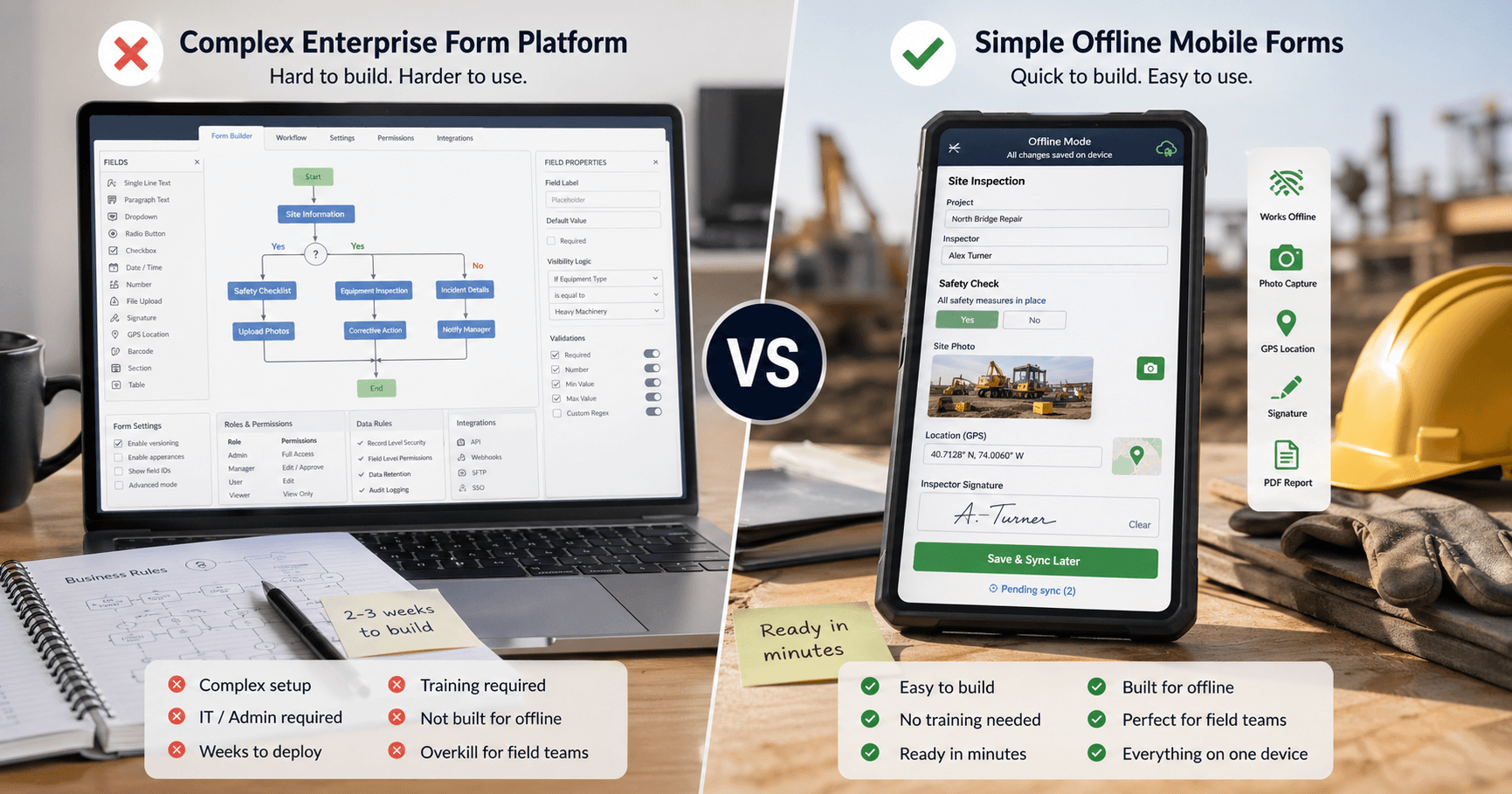
FastField: A Powerful but Expensive Platform
FastField (fastfieldforms.com) is a well-established mobile forms platform used by enterprise teams for field data collection. It offers a broad feature set including advanced conditional logic, barcode scanning, AI form conversion, dispatch routing, and deep integrations with tools like Salesforce, HubSpot, and SharePoint.
If you need every feature imaginable for large-scale field operations, FastField delivers. But that power comes with trade-offs:
- $25 per user per month, per FastField's own pricing guide (checked October 2026). There's a 14-day free trial (no credit card), but no permanent free tier
- Offline requires the native app — FastField has a web app for browser-based form filling, but offline data collection only works through their iOS and Android apps
- Steep learning curve — users consistently report needing training to get started
- Complex setup — form building with advanced logic takes time to master
- Hidden costs — some users report surprise charges for publicly accessed forms
For enterprise teams with dedicated IT support and big budgets, FastField can work. But for small to mid-sized teams that just need reliable offline forms? It's overkill.
Feature-by-Feature Comparison
| Feature | MobileForm | FastField |
|---|---|---|
| Price | Free tier; Pro $19/mo; Team $42/mo for the whole crew | $25/user/mo |
| Free plan | Free forever (3 forms, 50 subs/mo) | 14-day trial only, no free tier |
| Web access | Full app in browser (PWA) | Web app + admin portal |
| Offline mode | Full offline in browser (PWA) | Offline only via native iOS/Android app |
| Photo capture | Built-in with compression | Built-in |
| GPS tagging | Automatic per submission | Automatic per submission |
| Signatures | Built-in signature pad | Built-in |
| PDF export | On-device, instant | Server-side, template-based |
| Form builder | Simple field picker | Drag-and-drop + advanced logic |
| Conditional logic | Show/hide rules and calculation fields (Pro) | Advanced branching |
| Barcode scanning | Barcode and QR field (Pro) | Built-in |
| AI form converter | Start from a paper form: photos or a PDF, up to 20 pages | Scan paper → digital |
| Dispatch / routing | Assign jobs to unlimited field workers (Team) | Built-in |
| Integrations | Excel export, PDF emailed on submit, Google Sheets live sync (Pro and Team) | Zapier, Salesforce, HubSpot, 10+ more |
| Analytics dashboard | Basic | Advanced |
| Setup time | Minutes | Hours to days |
| Device support | Any device with a browser (online + offline) | Web app (online only) + native apps (offline) |
| Cost for a crew of 5 | $42/mo on Team (1 dispatcher + 4 field workers) | $125/mo |
Where FastField Wins
To be fair, FastField has real advantages for certain teams:
Advanced conditional logic
FastField supports complex branching and dynamic form behavior. If your forms need "if X then show Y and skip to section W," FastField handles it. MobileForm has show/hide rules and calculation fields on Pro, but not multi-step branching.
Enterprise integrations
Direct connections to Salesforce, HubSpot, SharePoint, SQL Server, SFTP, and more. If your data needs to flow into enterprise systems automatically, FastField has the pipes.
Automated routing
FastField can route submissions between people automatically. MobileForm's Team plan assigns jobs to field workers, but a dispatcher sends each job by hand.
If your organization has 50+ field workers, complex workflows, and an IT team to manage the deployment, FastField is built for that scale.
Where MobileForm Wins
MobileForm takes a fundamentally different approach: do fewer things, but do them exceptionally well, at a fraction of the cost.
Free forever tier
MobileForm offers a genuinely useful free plan — 3 forms or form groups, 50 submissions/month, with full offline support, photos, GPS, signatures, and PDF export included. FastField has no free plan at all.
Offline in the browser — no app install needed
MobileForm is a Progressive Web App (PWA). Open a link in any browser, and it works — including offline. FastField does offer a web app for online form filling, but if you need offline data collection, you have to install their native iOS or Android app. With MobileForm, offline just works in the browser.
Setup in minutes, not days
Build a form and fill it on your phone the same day. There's no training session required, no configuration wizard, no IT ticket.
Works on any device — online and offline
Because it's a PWA, MobileForm works offline on iPhones, Android phones, tablets, and laptops — any device with a modern browser. FastField's web app works in the browser too, but offline capability is limited to their native mobile apps.
Transparent, simple pricing
Free to start, $19/month for Pro, and $42/month for a Team plan that covers your whole crew. No per-user fees for field workers and no surprise bills for form access. FastField users have reported unexpected costs for publicly shared forms.
On-device PDF export
Generate PDF reports directly on your phone or tablet, even without internet. FastField's reports are generated server-side, requiring connectivity.
About 3x cheaper for a small crew
A crew of 5, one dispatcher and four field workers, costs $42/month on MobileForm Team. The same crew on FastField costs $125/month at $25 per user. Over a year, that's about $1,000 saved.
What FastField Users Say (The Pain Points)
We looked at hundreds of FastField reviews across G2, Capterra, GetApp, and TrustRadius. Here are the most common complaints:
"The learning curve is steep"
Multiple reviewers mention needing training to build forms and configure workflows. For non-technical field teams, this is a real barrier.
"Customer support is slow"
No phone support. Email responses take 1–12 hours. Users report having to chase support to get issues resolved, with slow progress on bug fixes.
"Reports are hard to customize"
Despite having server-side report generation, users find the reporting tools clunky and limited in customization. Creating polished client-facing reports is frustrating.
"Hidden billing surprises"
Some users discovered extra charges for publicly accessed forms — something not made clear during signup. Budget-conscious teams, especially NGOs, can't afford surprises.
"Form builder feels dated"
While functional, several reviewers note that the interface feels outdated compared to modern SaaS tools.
These aren't dealbreakers for large enterprises with dedicated budgets and IT support. But for small teams, solo inspectors, and NGOs? They're significant.
Who Should Choose Which?
Choose FastField if:
- You need submissions routed between people automatically
- Your forms need multi-step branching logic
- You need direct integrations with Salesforce, HubSpot, or SharePoint
- You have an IT team to manage deployment and training
- Budget isn't your primary constraint
Choose MobileForm if:
- You're a small team (1–20 people) that needs offline forms fast
- You want a free plan that actually works
- You don't want to install or manage native apps
- Your team isn't technical and needs something simple
- Budget matters — you want the core features at a fair price
- You work across different device types (phones, tablets, laptops)
- You need to generate PDF reports on-site without internet
The bottom line: FastField is a powerful enterprise platform. MobileForm is a fast, simple tool for small teams that you can start free. If you need enterprise integrations and automated routing, choose FastField. If you need offline forms, photos, signatures, PDFs, and simple dispatch that work in any browser, choose MobileForm.
Try MobileForm Free
See for yourself. MobileForm's free tier gives you everything you need to evaluate:
- 3 forms with the core field types (text, number, date, dropdown, photo, GPS, signature, and more)
- 50 submissions/month with full offline support
- Photo capture with automatic compression
- GPS tagging on every submission
- Digital signatures for approvals and sign-offs
- PDF export generated on-device
- No app download — works in any browser
- No credit card required
Set up your first form in under 5 minutes and see how it compares.
Ready to try MobileForm?
Free offline form builder for field teams. No app install needed.
Get started freeMore from the blog
MobileForm vs GoFormz: A Simpler, Cheaper Alternative for Small Teams
Compare MobileForm and GoFormz on offline access, pricing, setup time, PDF export, and fit for small field teams that need simpler mobile forms.
ComparisonThe 5 Best GoFormz Alternatives in 2026 (Compared)
The best GoFormz alternatives for 2026, compared on price, offline support, and setup: MobileForm, Appenate, TrueContext, Fulcrum, and Procore Forms.