Turn a PDF or paper form into a mobile form
Convert paper and PDF forms to digital forms your crew fills on a phone. Upload a PDF or a photo of each page, AI reads the fields, and you review them before saving. Below is a real import of our own work order template.
How it works
- Step 1
Upload the form
Add a PDF or a photo of each page: up to 20 pages per import on Pro and Team, 3 on Free.
- Step 2
Review the fields
AI suggests labels, field types, sections, and choices. Fix anything marked with a yellow dot, then save.
- Step 3
Fill it anywhere
Open the form on any phone, fill it offline, and export a PDF report from each submission.
A real import, step by step
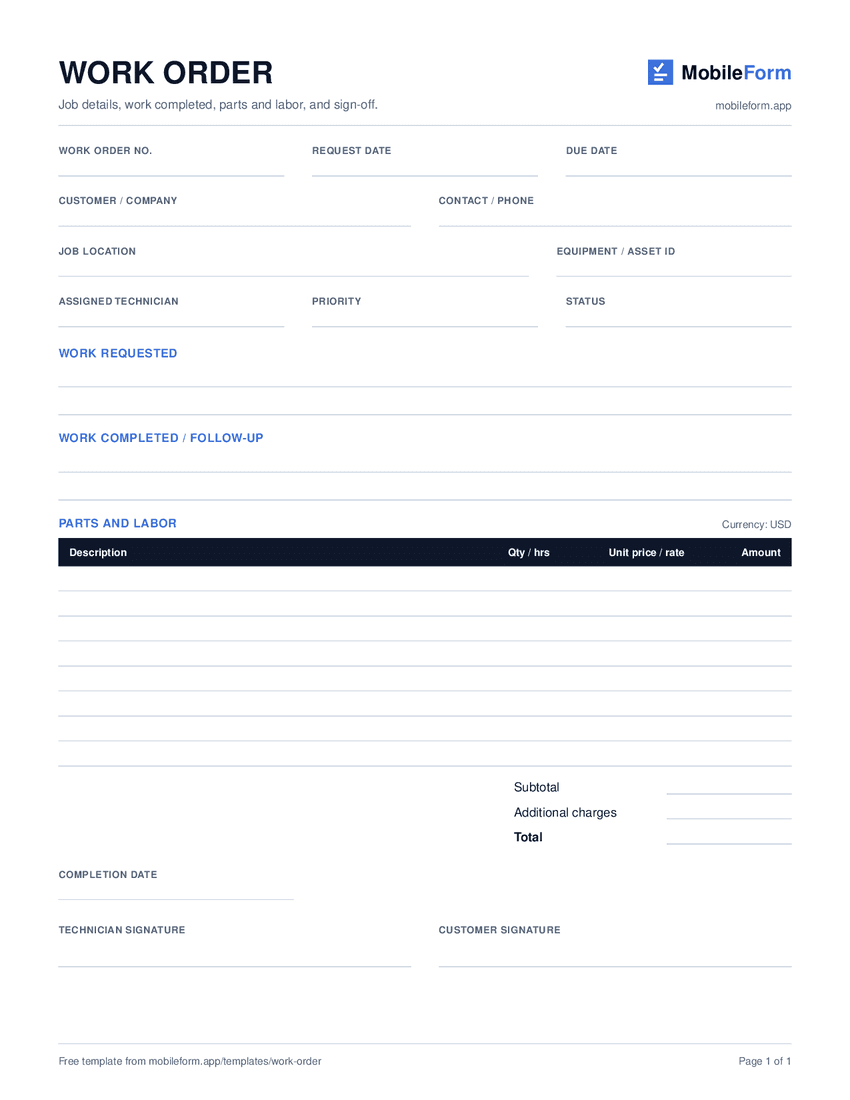
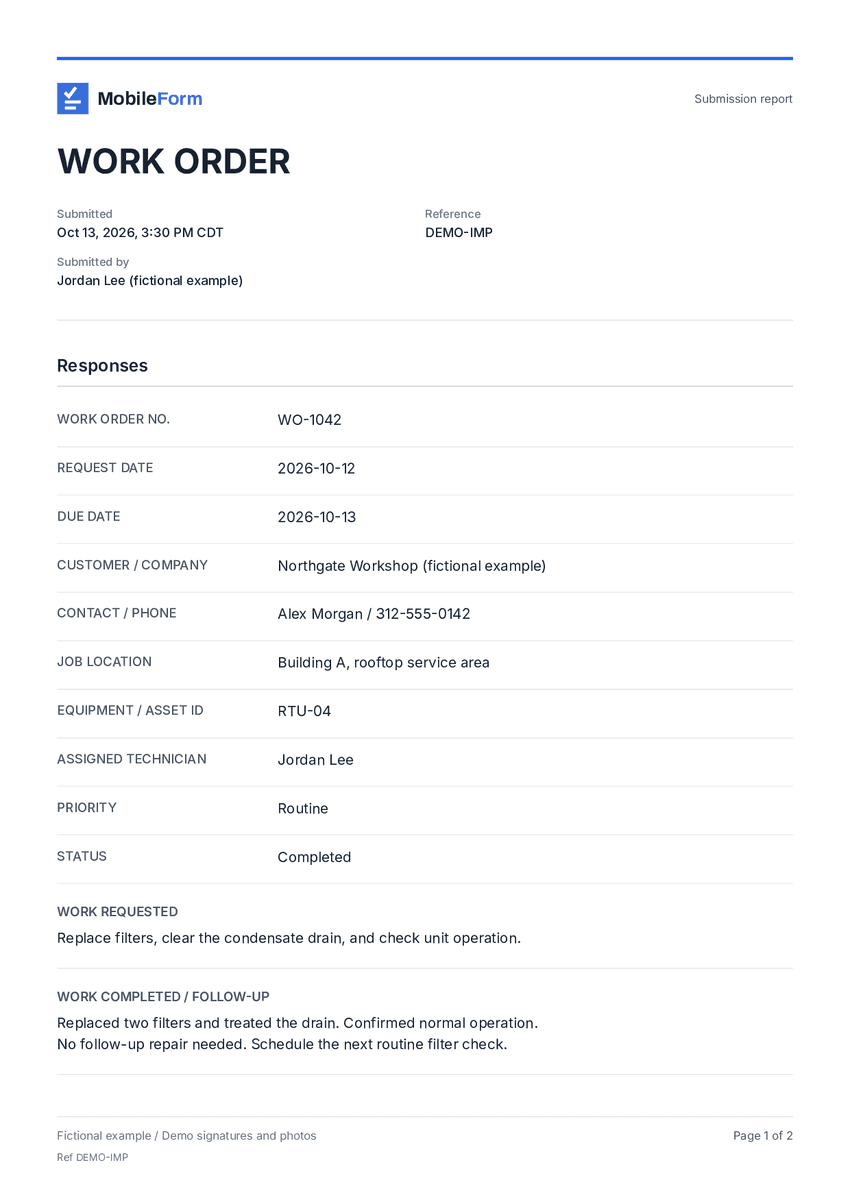
We ran our own printable work order through MobileForm's importer on October 12, 2026. Steps 1 and 2 show the real input and output. The report in step 4 is rendered straight from the import, before any review edits, with fictional sample answers.
- Step 1
The paper form
- Step 2
What the importer found
19 fields, titled “WORK ORDER”. 2 fields were flagged for review.
Field Type WORK ORDER NO. Short Text REQUEST DATE Date DUE DATE Date CUSTOMER / COMPANY Short Text CONTACT / PHONE Short Text JOB LOCATION Short Text EQUIPMENT / ASSET ID Short Text ASSIGNED TECHNICIAN Short Text PRIORITYCheck Short Text STATUSCheck Short Text WORK REQUESTED Long Text WORK COMPLETED / FOLLOW-UP Long Text PARTS AND LABOR Line Items Subtotal Number Additional charges Number Total Number COMPLETION DATE Date TECHNICIAN SIGNATURE Signature CUSTOMER SIGNATURE Signature - Step 3
Review before saving
Imported from your file, please review each field before saving. Fields with a yellow dot may need adjustment.- Rename any label
- Replace a field with one of a different type
- Edit dropdown options
- Mark fields required
- Reorder, add, or remove fields
- Step 4
The finished report
What it supports
- PDFs and JPEG, PNG, or HEIC photos. Each photo or PDF page counts as one page.
- Multi-page forms, read in order and merged into one form.
- 14 field types, including signatures, line items, and pass/fail, plus section headers and paragraphs.
- Printed choice lists become dropdown or multi-select options.
- Fields the AI is unsure about are flagged for review.
- A page counts toward your allowance only after the AI reads it successfully.
Limits
- It builds a MobileForm form. It does not make a fillable copy of your PDF's layout.
- Handwriting, faint scans, and unusual layouts can be misread, so review every field before saving.
- Barcode / QR, calculation, repeating section, attachment, and labor timer fields are not detected. Add them after importing.
- Import needs a connection. The form it creates works offline.
- Up to 50 fields are read from each group of three pages, and up to 250 per import.
Which plans include it
Free
$0 foreverAI import: 3 pages per import, 3 pages a month.
Pro
$19/user/moAI import: 20 pages per import, 100 pages a month.
Team
$42/moAI import: 20 pages per import, no monthly page cap.
AI import questions
Does it keep my PDF's layout?
No. It reads the fields and builds a mobile form from them. Completed submissions export as MobileForm PDF reports, not in your original layout.
What files can I upload?
PDFs, and JPEG, PNG, or HEIC photos. Each photo or PDF page counts as one page, up to 20 pages per import on Pro and Team, 3 on Free.
How accurate is it?
It depends on the page. Clear, upright pages with printed labels read best, and handwriting and faint scans are harder. Every import opens for review, with uncertain fields flagged, before you save. The walkthrough above shows a real result.
Does it work offline?
Importing needs a connection because the AI runs on our servers. The form it creates works offline once it has been opened on the device while online.
How many pages can I import each month?
Free: 3 pages a month. Pro: 100 pages a month. Team: no monthly page cap. A page counts only after the AI reads it successfully.
Are my uploads stored?
The pages are sent to the AI model to read the fields. MobileForm does not save the uploaded pages. It records a page count for your monthly allowance.
Templates and practical guides
Start from the form you already have.
Free includes AI import of 3 pages a month, plus 3 forms and 50 submissions a month.
Start free