Free work order template.
Keep job details, parts, labor, and sign-off in one record. Start with a printable PDF or an editable Excel workbook.
Free downloads. No signup required.
Customize in MobileForm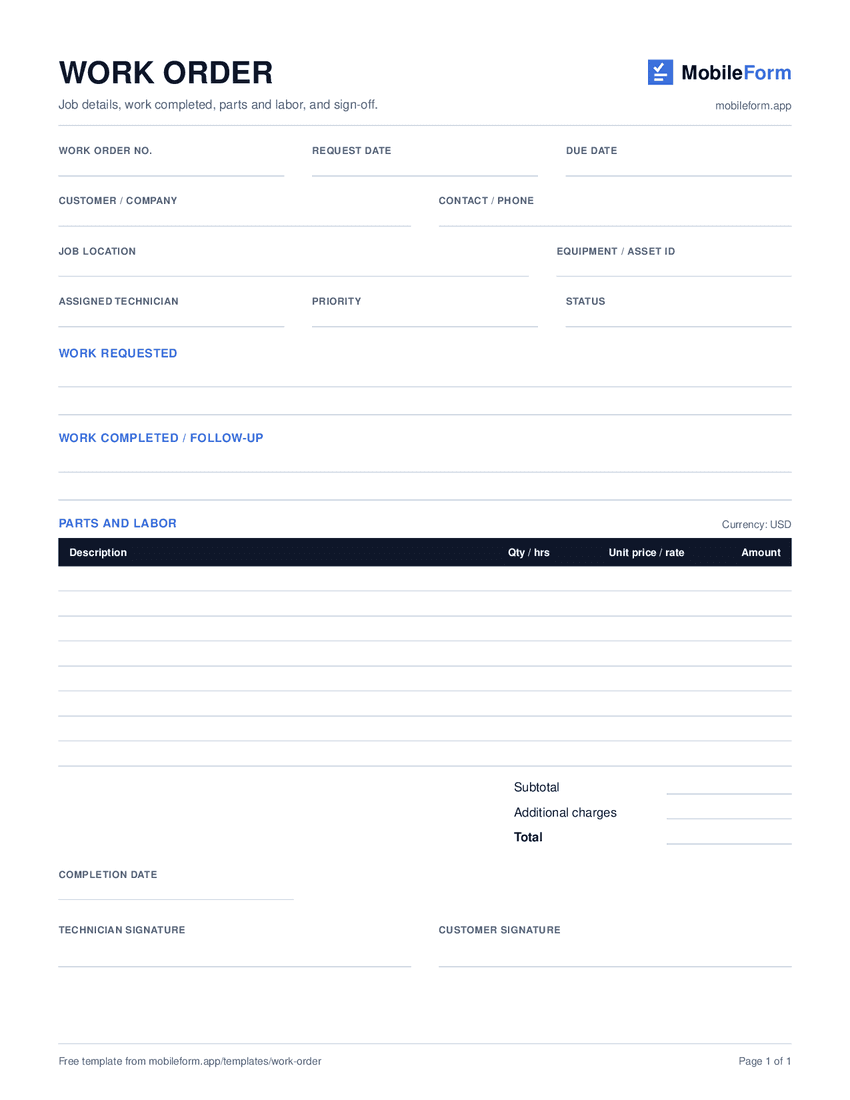
One-page US Letter PDF · ready to print
What’s included
A clear record from request to completion.
Use this service work order template for repairs, routine maintenance, and installation visits. Each section has room for the details your office and field crew need.
The PDF gives you a simple paper form. The Excel version adds editable cells and formulas for eight parts or labor entries, plus additional charges.
- 01
Job details
Give the job a work order number. Add the request date, due date, customer, contact, and service location.
- 02
Assignment and equipment
Record the technician, priority, status, and equipment or asset ID so the crew knows where to start.
- 03
Requested and completed work
Keep the original request separate from completion notes. Record unresolved issues and the next action.
- 04
Parts and labor
List each part or task, its quantity or hours, and the unit price or hourly rate. Check charges before sharing.
- 05
Completion and sign-off
Add the completion date and the relevant technician and customer sign-offs when the work is finished.
Completed example
An HVAC maintenance visit, filled in.
This fictional example records a rooftop-unit service call: replace two filters, clear the condensate drain, and check operation. Download the MobileForm PDF report to see the job details, calculated total, completion notes, a demo photo, and clearly labeled demonstration signatures.
Download completed exampleWork order WO-1042
Rooftop unit RTU-04
Illustrative figures · USD · no additional charges
| Item | Qty / hrs | Amount |
|---|---|---|
| Pleated filters | 2 | $37.00 |
| Drain treatment | 1 | $24.00 |
| Service labor | 1.5 | $142.50 |
| Total | $203.50 | |
Take the work order into the field.
Open the ready-made work order in MobileForm, adjust the fields, and save it. Your crew can add photos and signatures, then export the completed record as a PDF.
Customize in MobileForm- Job details and parts/labor fields already added
- Photo capture and customer or technician signatures
- Offline capture after opening the saved form online
- PDF reports from completed submissions
Free includes 3 forms and 50 submissions per month. Team adds assignments and prefilled work orders. Compare plans.
Templates and practical guides
Field service reports and work orders
See how assignments become completed records with photos and customer sign-off.
HVAC service forms
Add equipment readings and service details to your work-order workflow.
Free maintenance work order template
For equipment and facility maintenance: asset, fault, downtime, and supervisor sign-off.
Work order template questions
Are the work order templates free?
Yes. Download the blank PDF, Excel workbook, and completed example without signing up. You can edit and reuse them for your own service jobs.
Which file should I use?
Use the printable PDF for a clipboard or paper record. Use Excel to type job details and calculate parts and labor totals. The completed example shows a MobileForm PDF report for a fictional service visit, including demonstration signature images. Its layout differs from the blank paper template. Neither PDF contains interactive form fields.
Does the Excel template calculate totals?
Yes. Enter a description, quantity or hours, and unit price or hourly rate for each item. The workbook calculates line amounts and a subtotal. Enter any additional charges in the labeled cell; the total includes that amount. Currency is labeled USD and can be changed for your business.
Can I use this as a maintenance or HVAC work order?
Yes. Use the equipment or asset ID for the unit being serviced, describe the fault or planned maintenance, and record parts, labor, completion notes, and any follow-up. Adjust the fields to match your process. For equipment maintenance with downtime and root cause, use the maintenance work order template.
Is a work order the same as an invoice?
A work order describes and records a job: what was requested, who handled it, and what was completed. An invoice requests payment. Use the completed work order to prepare your invoice, and add the billing details your business requires.
Can I use the template offline in MobileForm?
Choose Customize in MobileForm to open an editable form with the work-order fields already added. Save the form and open it on the device while online before heading out. You can then capture answers, photos, and signatures offline and sync when connected. Free includes 3 forms and 50 submissions per month; assigning work to field workers requires Team.