Free QC inspection checklist template.
Mark each check pass, fail, or N/A, record any defects, and decide what happens to the lot. Print the PDF or use the Excel workbook to count results.
Free downloads. No signup required.
Customize in MobileForm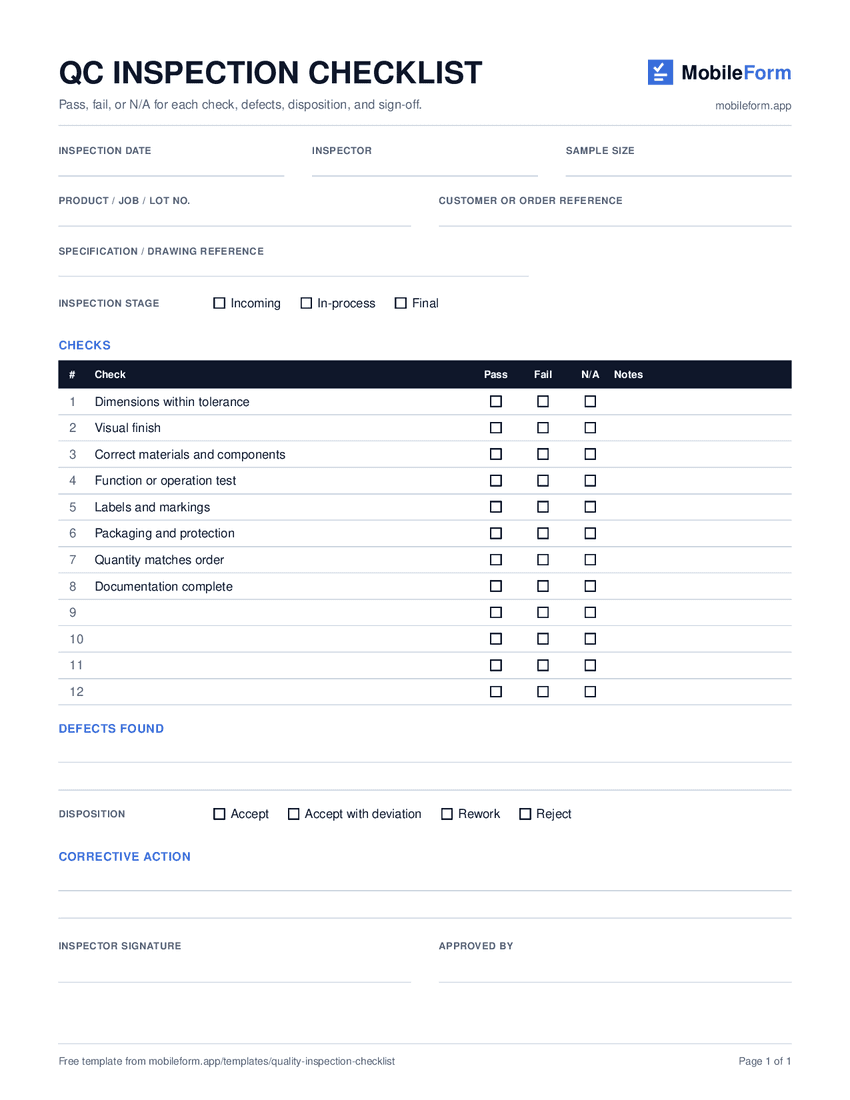
One-page US Letter PDF · ready to print
What’s included
The same checks, every inspection.
Use it for incoming material, in-process checks, or final inspection before shipping or handover. Every inspector works through the same eight checks, and there is room for four of your own.
The PDF has Pass, Fail, and N/A boxes for each check. The Excel version adds dropdowns and counts the passes, fails, and N/As for you.
- 01
Inspection details
Record the date, inspector, product, job or lot number, and the customer or order it belongs to.
- 02
Stage and specification
Mark the stage as incoming, in-process, or final, and note the specification or drawing and the sample size.
- 03
Eight standard checks
Dimensions, visual finish, materials, function, labels, packaging, quantity, and documentation, each marked pass, fail, or N/A.
- 04
Defects and photos
Describe each defect so it can be found again. In MobileForm, attach photos as evidence.
- 05
Disposition and corrective action
Accept, accept with deviation, rework, or reject, plus what will stop the defect from happening again.
- 06
Sign-off
The inspector signs, and a supervisor or quality lead approves.
Completed example
A final inspection, filled in.
This fictional example records a final inspection of 50 steel mounting brackets. Two parts failed on finish and go back for rework. Download the MobileForm PDF report to see each check result, the defect notes, a demo photo, and clearly labeled demonstration signatures.
Download completed exampleLot B-2291
Steel mounting brackets
Final inspection · sample of 50 · DWG SB-40 rev C
| Check | Result |
|---|---|
| Dimensions within tolerance | Pass |
| Visual finish | Fail |
| Correct materials and components | Pass |
| Function or operation test | N/A |
| Labels and markings | Pass |
| Packaging and protection | Pass |
| Quantity matches order | Pass |
| Documentation complete | Pass |
| Disposition | Rework |
Take the checklist onto the floor.
Open the ready-made checklist in MobileForm, adjust the checks, and save it. Inspectors can photograph defects and sign on the device, then export the completed inspection as a PDF.
Customize in MobileForm- Eight pass, fail, or N/A checks already added
- Defect photos and inspector and approver signatures
- Offline capture after opening the saved form online
- PDF reports from completed submissions
On Pro, you can add conditional logic, for example a note field under Visual finish that only appears when that check is marked Fail. Learn how conditional logic works.
Free includes 3 forms and 50 submissions per month. Team adds assignments with prefilled inspection details. Compare plans.
Templates and practical guides
Quality control checklist app
Run pass/fail checks with photos and sign-off on any device.
Property inspection forms
Room-by-room condition reports with photos and repeating sections.
More free templates
Work orders and maintenance work orders, each with a printable PDF, Excel workbook, and completed example.
QC inspection checklist questions
Is the QC checklist template free?
Yes. Download the blank PDF, Excel workbook, and completed example without signing up, and reuse them for your own inspections.
Can I change the checks?
Yes. Edit the eight checks to match your specification and use the four blank rows for your own. In MobileForm, rename, add, or remove check fields before saving the form.
What does N/A mean on the checklist?
Use N/A when a check does not apply to the item being inspected, for example a function test on a part with no moving parts. Leaving it blank instead would look like a missed check.
What do the disposition options mean?
Accept: the lot meets the specification. Accept with deviation: it does not fully meet the specification but is approved for use, which should be documented. Rework: fix the defective items and inspect them again. Reject: return or scrap the lot.
Does the Excel template count results?
Yes. Pick Pass, Fail, or N/A from the dropdown for each check, and the summary counts each result.
Can I use the checklist offline in MobileForm?
Choose Customize in MobileForm to open an editable form with the checks already added. Save the form and open it on the device while online before heading out. You can then mark checks, take defect photos, and sign offline and sync when connected. Free includes 3 forms and 50 submissions per month; assigning inspections to your team requires Team.